5月 20
手元にmac環境しかありませんのでmacで話を進めます。
まずはCarbon Emacsをダウンロード
次にrinariをダウンロード
gitコマンドを入れてない人は
Macの人はmac portsをインストールしてください
sudo port install git-core +gitweb +svn
GUIが良い人はporticusからでもgitを入れてください。
さて、gitのインストールがすんでいる人はrinariとrhtml-mode(erbのハイライト)をインストールします。
インストールする場所は何処でも良いのですがここではホームディレクトリ以下の~/.emacs.d/にインストールします
cd ~/.emacs.d
git clone git://github.com/eschulte/rinari.git
cd rinari
git submodule init
git submodule update
cd ~/.emacs.d
git clone git://github.com/eschulte/rhtml.git
rinariにはsnippetが入っていないのでyasnippetとRails snippetsをインストールします。
yasnippetのダウンロードページにはyasnippet-bundleとyasnippetがありますが
今回はyasnippet-0.5.10.tar.bz2をダウンロード
cd ~/.emacs.d
curl -O http://yasnippet.googlecode.com/files/yasnippet-0.5.10.tar.bz2
tar jxf yasnippet-0.5.10.tar.bz2
cd yasnippet-0.5.10
mv * ../
cd ../
rm -rf yasnippet-0.5.10
rm yasnippet-0.5.10.tar.bz2
cd ~/.emacs.d/snippets
git clone git://github.com/eschulte/yasnippets-rails.git
これでrailsの開発環境が整いましたが、linum(行番号表示機能)とelscreen(タブ機能)を追加します
cd ~/.emacs.d/
curl -O http://stud4.tuwien.ac.at/~e0225855/linum/linum.el
curl -O ftp://ftp.morishima.net:21//pub/morishima.net/naoto/ElScreen/elscreen-1.4.6.tar.gz
tar xzvf elscreen-1.4.6.tar.gz
mv ~/.emacs.d/elscreen-1.4.6/elscreen.el ~/.emacs.d/
rm -rf ~/.emacs.d/elscreen-1.4.6
rm ~/.emacs.d/elscreen-1.4.6.tar.gz
次に.emacsの設定に移ります。
cd ~/
vi .emacs
なんでviなんだって話だと思うんですが、emacsにまだなれてなくて。。
;;; utf8
(set-language-environment "Japanese")
(set-terminal-coding-system 'utf-8)
(set-keyboard-coding-system 'utf-8)
(set-buffer-file-coding-system 'utf-8)
(setq default-buffer-file-coding-system 'utf-8)

;;; base setting
(setq line-number-mode t) ;;カーソル行番号表示
(setq inhibit-startup-message t) ;;スタートアップメッセージ非表示
(setq-default tab-width 4) ;;tab4文字
(setq make-backup-files nil) ;;バックアップファイルを作らない
(setq visible-bell t) ;;警告音無し
(setq frame-title-format "%b") ;;タイトルにファイル名表示
(display-time) ;;時計表示
(auto-compression-mode t) ;;日本語info文字化け防止
(global-hl-line-mode) ;;行ハイライト
(tool-bar-mode nil) ;;ツールバー非表示
(show-paren-mode 1) ;;対応括弧ハイライト

;;; color
(setq initial-frame-alist
(append (list
 '(width . 120) ;;フレームの幅
 '(height . 40) ;;フレームの高さ
 '(top . 0) ;;Y 表示位置
 '(left . 340) ;;X 表示位置
)
initial-frame-alist))
(setq default-frame-alist initial-frame-alist)
(set-frame-parameter nil 'alpha 90 ) ;;windowの透明度設定

;;; theme-monokai
(custom-set-faces
 '(default ((t (:stipple nil :background "#272822" :foreground "#F8F8F2" :inverse-video nil :box nil :strike-through nil :overline nil :underline nil :slant normal :weight normal :height 98 :width normal :family "outline-consolas"))))
 '(cursor ((t (:background "#F8F8F2" :foreground "#272822"))))
 '(font-lock-comment-face ((((class color) (min-colors 88) (background dark)) (:foreground "#75715E"))))
 '(font-lock-function-name-face ((((class color) (min-colors 88) (background dark)) (:foreground "#A6E22E"))))
 '(font-lock-keyword-face ((((class color) (min-colors 88) (background dark)) (:foreground "#F92672"))))
 '(font-lock-preprocessor-face ((t (:inherit font-lock-builtin-face :foreground "#66d9ef"))))
 '(font-lock-string-face ((((class color) (min-colors 88) (background dark)) (:foreground "#E6DB74"))))
 '(font-lock-type-face ((((class color) (min-colors 88) (background dark)) (:foreground "#66d9ef"))))
 '(font-lock-variable-name-face ((((class color) (min-colors 88) (background dark)) (:foreground "#FD971F"))))
 '(region ((((class color) (min-colors 88) (background dark)) (:background "#49483E"))))
 '(show-paren-match ((((class color) (background dark)) (:background "#3E3D32"))))
 '(variable-pitch ((t (:family "DejaVu Sans")))))

(setq load-path
(append
(list
(expand-file-name "~/.emacs.d/")
)
load-path))

;; Interactively Do Things (highly recommended, but not strictly required)
(require 'ido)
(ido-mode t)

;; Rinari
(add-to-list 'load-path "~/.emacs.d/rinari")
(require 'rinari)

;;; rhtml-mode
(add-to-list 'load-path "~/.emacs.d/rhtml")
(require 'rhtml-mode)
(add-hook 'rhtml-mode-hook
(lambda () (rinari-launch)))

;;; yasnippet
(require 'yasnippet)
(yas/initialize)
(yas/load-directory "~/.emacs.d/snippets/rails-snippets")

;;; line-number
(require 'linum)
(global-linum-mode t)
(setq linum-format "%5d")

;;; elscreen
(require 'elscreen)
;; PrefixキーをC-zに割り当て
(if window-system
 (define-key elscreen-map "\C-z" 'iconify-or-deiconify-frame)
  (define-key elscreen-map "\C-z" 'suspend-emacs))
エラーが出るようであればpluginのパスを環境に合わせて変えてみてください。
emacsを立ち上げて
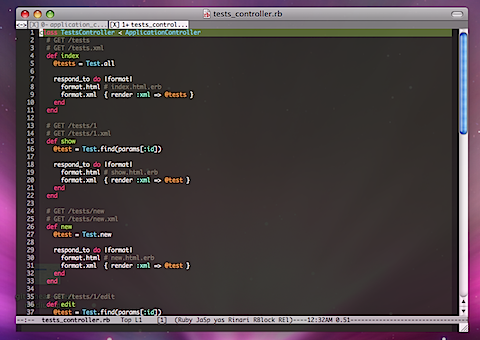
こんな画面になれば成功です。
C-c ; wでmongrel起動
C-c C-cでmongrel終了
その他キーバインドはまた次の機会にでも書きたいと思います。
間違い等がありましたら教えて頂けると助かります。